

 Bahasa Indonesia
 Deutsch
 English
 Español
 Français
 Português (Brasil)
 Türkçe
 ไทย
 中文(简体)
 日本語
 한국어
移動
機器人有兩個輪子,各自有一個馬達:在入門機器人上是 left wheel motor 和 right wheel motor。你可以設定每個輪子的速度來駕駛它:
| 左輪 | 右輪 | 機器人會…… |
|---|---|---|
| 前進 | 前進 | 往前走 |
| 後退 | 後退 | 往後退 |
| 後退 | 前進 | 原地向左轉 |
| 前進 | 後退 | 原地向右轉 |
| 快 | 慢 | 向右彎 |
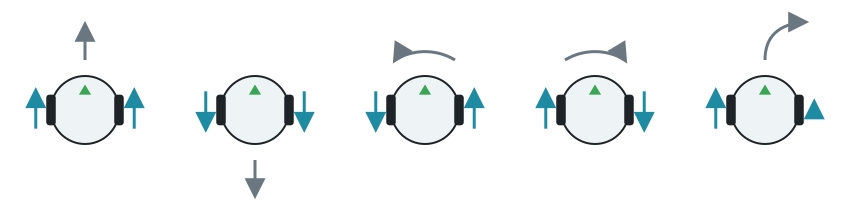
速度的單位是弧度每秒,最高 6.28(每秒轉一圈)。負的速度會讓輪子向後轉。
- 依名稱取得每個馬達。
- 把它的位置設為無限大,讓它可以不受限制地轉動。
- 設定它的速度。
馬達會維持你最後設定的速度,所以在程式做其他事情時,機器人會繼續移動。這個程式會讓機器人往前、往後,再原地向左轉,各一秒:
from controller import Robot
robot = Robot()timeStep = int(robot.getBasicTimeStep())maxSpeed = 6.28  # The maximum speed of the wheels, in radians per second
leftWheel = robot.getDevice("left wheel motor")rightWheel = robot.getDevice("right wheel motor")leftWheel.setPosition(float("inf"))rightWheel.setPosition(float("inf"))
def drive(left, right, seconds):    # Set the speed of each wheel, and keep it for some time    leftWheel.setVelocity(left)    rightWheel.setVelocity(right)    start = robot.getTime()    while robot.step(timeStep) != -1:        if robot.getTime() - start >= seconds:            break
drive(maxSpeed, maxSpeed, 1.0)    # Forwarddrive(-maxSpeed, -maxSpeed, 1.0)  # Backwarddrive(-2.0, 2.0, 1.0)             # Spin to the leftdrive(0, 0, 0.1)                  # Stopprint("Done")
#include <iostream>#include <cmath>#include <webots/Robot.hpp>#include <webots/Motor.hpp>
using namespace webots;
Robot *robot;Motor *leftWheel, *rightWheel;int timeStep;const double maxSpeed = 6.28; // The maximum speed of the wheels, in radians per second
// Set the speed of each wheel, and keep it for some timevoid drive(double left, double right, double seconds) { leftWheel->setVelocity(left); rightWheel->setVelocity(right); double start = robot->getTime(); while (robot->step(timeStep) != -1) { if (robot->getTime() - start >= seconds) break; }}
int main() { robot = new Robot(); timeStep = (int)robot->getBasicTimeStep();
leftWheel = robot->getMotor("left wheel motor"); rightWheel = robot->getMotor("right wheel motor"); leftWheel->setPosition(INFINITY); rightWheel->setPosition(INFINITY);
drive(maxSpeed, maxSpeed, 1.0); // Forward drive(-maxSpeed, -maxSpeed, 1.0); // Backward drive(-2.0, 2.0, 1.0); // Spin to the left drive(0, 0, 0.1); // Stop std::cout << "Done" << std::endl;
delete robot; return 0;}測量輪子轉了多少
Section titled “測量輪子轉了多少”每個馬達都有一個位置感測器,也稱為編碼器(encoder),它會計算輪子轉了多少,單位是弧度。這對行駛固定距離很有用。向後轉時,計數會減少。
from controller import Robot
robot = Robot()timeStep = int(robot.getBasicTimeStep())
leftWheel = robot.getDevice("left wheel motor")rightWheel = robot.getDevice("right wheel motor")leftWheel.setPosition(float("inf"))rightWheel.setPosition(float("inf"))
# Each wheel has a position sensor, which counts how far it has turnedleftEncoder = leftWheel.getPositionSensor()rightEncoder = rightWheel.getPositionSensor()leftEncoder.enable(timeStep)rightEncoder.enable(timeStep)
robot.step(timeStep)  # Step once, so that the sensors have a valuestart = leftEncoder.getValue()
leftWheel.setVelocity(5.0)rightWheel.setVelocity(5.0)
while robot.step(timeStep) != -1:    turned = leftEncoder.getValue() - start    if turned > 10.0:  # Stop after 10 radians        break
leftWheel.setVelocity(0)rightWheel.setVelocity(0)print("Left wheel:", round(leftEncoder.getValue() - start, 2), "rad")
#include <iostream>#include <cmath>#include <webots/Robot.hpp>#include <webots/Motor.hpp>#include <webots/PositionSensor.hpp>
using namespace webots;using namespace std;
int main() { Robot *robot = new Robot(); int timeStep = (int)robot->getBasicTimeStep();
Motor *leftWheel = robot->getMotor("left wheel motor"); Motor *rightWheel = robot->getMotor("right wheel motor"); leftWheel->setPosition(INFINITY); rightWheel->setPosition(INFINITY);
// Each wheel has a position sensor, which counts how far it has turned PositionSensor *leftEncoder = leftWheel->getPositionSensor(); PositionSensor *rightEncoder = rightWheel->getPositionSensor(); leftEncoder->enable(timeStep); rightEncoder->enable(timeStep);
robot->step(timeStep); // Step once, so that the sensors have a value double start = leftEncoder->getValue();
leftWheel->setVelocity(5.0); rightWheel->setVelocity(5.0);
while (robot->step(timeStep) != -1) { double turned = leftEncoder->getValue() - start; if (turned > 10.0) // Stop after 10 radians break; }
leftWheel->setVelocity(0); rightWheel->setVelocity(0); cout << "Left wheel: " << leftEncoder->getValue() - start << " rad" << endl;
delete robot; return 0;}用時間控制移動很簡單,但結果會隨速度而改變。編碼器測量的是移動本身,所以更可靠。若要精確轉彎,陀螺儀效果更好。
接下來,學習讀取感測器。

Erebus 是 RoboCupJunior Rescue 的一部分。
新聞、活動與隊伍文件:RCJ Rescue 社群網站
© 2020–2026 Erebus Development Team