

 Bahasa Indonesia
 Deutsch
 English
 Español
 Français
 Português (Brasil)
 Türkçe
 ไทย
 中文(简体)
 日本語
 한국어
光達
光達(LIDAR)會測量機器人周圍一整圈的距離,單位是公尺,就像同時使用許多個距離感測器。在入門機器人上,它的名稱是 lidar,位於機器人頂部。
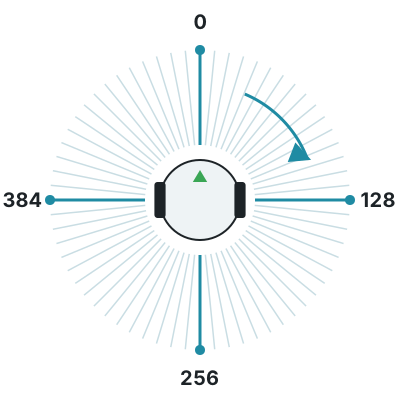
它會在機器人周圍測量 512 個點,分成上下堆疊的 4 層,最遠 1 m。沒有碰到任何物體的點會讀到 inf。
getLayerRangeImage(0) 會提供一層的 512 個距離。第一個點在機器人正前方,接著順時針排列:四分之一處在右方,一半處在後方,四分之三處在左方。
from controller import Robot
robot = Robot()timeStep = int(robot.getBasicTimeStep())
lidar = robot.getDevice("lidar")lidar.enable(timeStep)n = lidar.getHorizontalResolution()  # Number of points in each layerprint("Points per layer:", n, "Layers:", lidar.getNumberOfLayers())
while robot.step(timeStep) != -1:    distances = lidar.getLayerRangeImage(0)  # One layer, in meters, clockwise from the front    front = distances[0]    right = distances[n // 4]    back = distances[n // 2]    left = distances[3 * n // 4]    print("front:", round(front, 3), "right:", round(right, 3), "back:", round(back, 3), "left:", round(left, 3))
#include <iostream>#include <webots/Robot.hpp>#include <webots/Lidar.hpp>
using namespace webots;using namespace std;
int main() { Robot *robot = new Robot(); int timeStep = (int)robot->getBasicTimeStep();
Lidar *lidar = robot->getLidar("lidar"); lidar->enable(timeStep); int n = lidar->getHorizontalResolution(); // Number of points in each layer cout << "Points per layer: " << n << " Layers: " << lidar->getNumberOfLayers() << endl;
while (robot->step(timeStep) != -1) { const float *distances = lidar->getLayerRangeImage(0); // One layer, in meters, clockwise from the front cout << "front: " << distances[0] << " right: " << distances[n / 4] << " back: " << distances[n / 2] << " left: " << distances[3 * n / 4] << endl; }
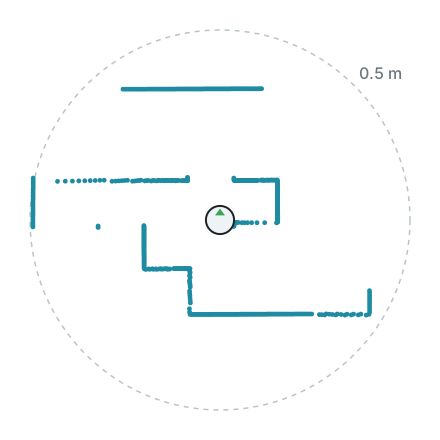
delete robot; return 0;}下圖是入門機器人在 world1.wbt 中測得的一層資料,從上方繪製,機器人位於中央。周圍的牆壁會顯示成一排排的點。
光達也可以把每個點提供為相對於光達的位置,這對畫出機器人所見的地圖很有用。計算點雲需要額外的時間,所以只有在會用到時才啟用它。
from controller import Robot
robot = Robot()timeStep = int(robot.getBasicTimeStep())
lidar = robot.getDevice("lidar")lidar.enable(timeStep)lidar.enablePointCloud()  # Computing the point cloud takes extra time
while robot.step(timeStep) != -1:    points = lidar.getPointCloud()    point = points[0]  # Positions relative to the lidar, in meters    print("x:", round(point.x, 3), "y:", round(point.y, 3), "z:", round(point.z, 3), "layer:", point.layer)
#include <iostream>#include <webots/Robot.hpp>#include <webots/Lidar.hpp>
using namespace webots;using namespace std;
int main() { Robot *robot = new Robot(); int timeStep = (int)robot->getBasicTimeStep();
Lidar *lidar = robot->getLidar("lidar"); lidar->enable(timeStep); lidar->enablePointCloud(); // Computing the point cloud takes extra time
while (robot->step(timeStep) != -1) { const LidarPoint *points = lidar->getPointCloud(); const LidarPoint &point = points[0]; // Positions relative to the lidar, in meters cout << "x: " << point.x << " y: " << point.y << " z: " << point.z << " layer: " << point.layer_id << endl; }
delete robot; return 0;}
Erebus 是 RoboCupJunior Rescue 的一部分。
新聞、活動與隊伍文件:RCJ Rescue 社群網站
© 2020–2026 Erebus Development Team