

 Bahasa Indonesia
 Deutsch
 Español
 Français
 Português (Brasil)
 Türkçe
 ไทย
 中文(简体)
 中文(繁體)
 日本語
 한국어
Movement
The robot has two wheels, each with its own motor: left wheel motor and right wheel motor on the starter robot. You drive it by setting the speed of each wheel:
| Left wheel | Right wheel | The robot… |
|---|---|---|
| Forward | Forward | Drives forward |
| Backward | Backward | Drives backward |
| Backward | Forward | Spins to the left |
| Forward | Backward | Spins to the right |
| Fast | Slow | Curves to the right |
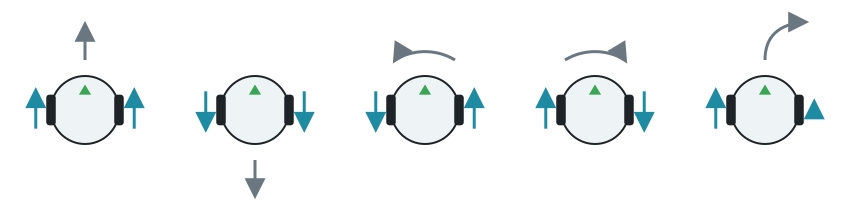
Speeds are in radians per second, up to 6.28 (one turn of the wheel per second). Negative speeds turn the wheel backward.
Driving
Section titled “Driving”- Get each motor by its name.
- Set its position to infinity, so that it turns without limit.
- Set its velocity.
The motors keep the last speed you set, so the robot keeps moving while your program does other things. This program drives forward, backward, and spins to the left, for one second each:
from controller import Robot
robot = Robot()timeStep = int(robot.getBasicTimeStep())maxSpeed = 6.28  # The maximum speed of the wheels, in radians per second
leftWheel = robot.getDevice("left wheel motor")rightWheel = robot.getDevice("right wheel motor")leftWheel.setPosition(float("inf"))rightWheel.setPosition(float("inf"))
def drive(left, right, seconds):    # Set the speed of each wheel, and keep it for some time    leftWheel.setVelocity(left)    rightWheel.setVelocity(right)    start = robot.getTime()    while robot.step(timeStep) != -1:        if robot.getTime() - start >= seconds:            break
drive(maxSpeed, maxSpeed, 1.0)    # Forwarddrive(-maxSpeed, -maxSpeed, 1.0)  # Backwarddrive(-2.0, 2.0, 1.0)             # Spin to the leftdrive(0, 0, 0.1)                  # Stopprint("Done")
#include <iostream>#include <cmath>#include <webots/Robot.hpp>#include <webots/Motor.hpp>
using namespace webots;
Robot *robot;Motor *leftWheel, *rightWheel;int timeStep;const double maxSpeed = 6.28; // The maximum speed of the wheels, in radians per second
// Set the speed of each wheel, and keep it for some timevoid drive(double left, double right, double seconds) { leftWheel->setVelocity(left); rightWheel->setVelocity(right); double start = robot->getTime(); while (robot->step(timeStep) != -1) { if (robot->getTime() - start >= seconds) break; }}
int main() { robot = new Robot(); timeStep = (int)robot->getBasicTimeStep();
leftWheel = robot->getMotor("left wheel motor"); rightWheel = robot->getMotor("right wheel motor"); leftWheel->setPosition(INFINITY); rightWheel->setPosition(INFINITY);
drive(maxSpeed, maxSpeed, 1.0); // Forward drive(-maxSpeed, -maxSpeed, 1.0); // Backward drive(-2.0, 2.0, 1.0); // Spin to the left drive(0, 0, 0.1); // Stop std::cout << "Done" << std::endl;
delete robot; return 0;}Measuring how far a wheel turned
Section titled “Measuring how far a wheel turned”Each motor has a position sensor, also called an encoder, which counts how far the wheel has turned, in radians. It is useful to drive a fixed distance. Turning backward makes the count go down.
from controller import Robot
robot = Robot()timeStep = int(robot.getBasicTimeStep())
leftWheel = robot.getDevice("left wheel motor")rightWheel = robot.getDevice("right wheel motor")leftWheel.setPosition(float("inf"))rightWheel.setPosition(float("inf"))
# Each wheel has a position sensor, which counts how far it has turnedleftEncoder = leftWheel.getPositionSensor()rightEncoder = rightWheel.getPositionSensor()leftEncoder.enable(timeStep)rightEncoder.enable(timeStep)
robot.step(timeStep)  # Step once, so that the sensors have a valuestart = leftEncoder.getValue()
leftWheel.setVelocity(5.0)rightWheel.setVelocity(5.0)
while robot.step(timeStep) != -1:    turned = leftEncoder.getValue() - start    if turned > 10.0:  # Stop after 10 radians        break
leftWheel.setVelocity(0)rightWheel.setVelocity(0)print("Left wheel:", round(leftEncoder.getValue() - start, 2), "rad")
#include <iostream>#include <cmath>#include <webots/Robot.hpp>#include <webots/Motor.hpp>#include <webots/PositionSensor.hpp>
using namespace webots;using namespace std;
int main() { Robot *robot = new Robot(); int timeStep = (int)robot->getBasicTimeStep();
Motor *leftWheel = robot->getMotor("left wheel motor"); Motor *rightWheel = robot->getMotor("right wheel motor"); leftWheel->setPosition(INFINITY); rightWheel->setPosition(INFINITY);
// Each wheel has a position sensor, which counts how far it has turned PositionSensor *leftEncoder = leftWheel->getPositionSensor(); PositionSensor *rightEncoder = rightWheel->getPositionSensor(); leftEncoder->enable(timeStep); rightEncoder->enable(timeStep);
robot->step(timeStep); // Step once, so that the sensors have a value double start = leftEncoder->getValue();
leftWheel->setVelocity(5.0); rightWheel->setVelocity(5.0);
while (robot->step(timeStep) != -1) { double turned = leftEncoder->getValue() - start; if (turned > 10.0) // Stop after 10 radians break; }
leftWheel->setVelocity(0); rightWheel->setVelocity(0); cout << "Left wheel: " << leftEncoder->getValue() - start << " rad" << endl;
delete robot; return 0;}Timing a move is simple, but the result changes with the speed. Encoders measure the move itself, so they are more reliable. For precise turns, the gyro is better still.
Next, learn to read the sensors.

Erebus is part of RoboCupJunior Rescue.
News, events and team documents: RCJ Rescue Community Website
© 2020–2026 Erebus Development Team