

 Bahasa Indonesia
 Deutsch
 English
 Français
 Português (Brasil)
 Türkçe
 ไทย
 中文(简体)
 中文(繁體)
 日本語
 한국어
Movimiento
El robot tiene dos ruedas, cada una con su propio motor: left wheel motor y right wheel motor en el robot inicial. Lo conduces ajustando la velocidad de cada rueda:
| Rueda izquierda | Rueda derecha | El robot… |
|---|---|---|
| Adelante | Adelante | Avanza |
| Atrás | Atrás | Retrocede |
| Atrás | Adelante | Gira sobre sí mismo a la izquierda |
| Adelante | Atrás | Gira sobre sí mismo a la derecha |
| Rápida | Lenta | Describe una curva a la derecha |
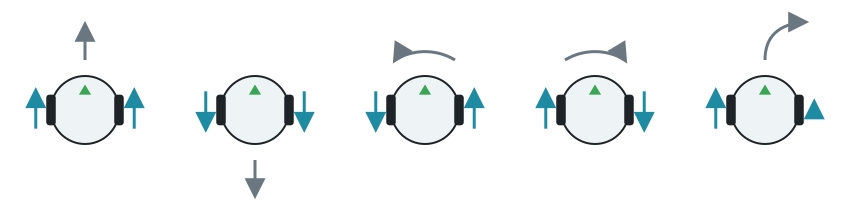
Las velocidades están en radianes por segundo, hasta 6,28 (una vuelta de rueda por segundo). Las velocidades negativas hacen girar la rueda hacia atrás.
Conducir
Sección titulada «Conducir»- Obtén cada motor por su nombre.
- Pon su posición en infinito, para que gire sin límite.
- Ajusta su velocidad.
Los motores mantienen la última velocidad que ajustaste, así que el robot sigue moviéndose mientras tu programa hace otras cosas. Este programa avanza, retrocede y gira sobre sí mismo a la izquierda, durante un segundo cada vez:
from controller import Robot
robot = Robot()timeStep = int(robot.getBasicTimeStep())maxSpeed = 6.28  # The maximum speed of the wheels, in radians per second
leftWheel = robot.getDevice("left wheel motor")rightWheel = robot.getDevice("right wheel motor")leftWheel.setPosition(float("inf"))rightWheel.setPosition(float("inf"))
def drive(left, right, seconds):    # Set the speed of each wheel, and keep it for some time    leftWheel.setVelocity(left)    rightWheel.setVelocity(right)    start = robot.getTime()    while robot.step(timeStep) != -1:        if robot.getTime() - start >= seconds:            break
drive(maxSpeed, maxSpeed, 1.0)    # Forwarddrive(-maxSpeed, -maxSpeed, 1.0)  # Backwarddrive(-2.0, 2.0, 1.0)             # Spin to the leftdrive(0, 0, 0.1)                  # Stopprint("Done")
#include <iostream>#include <cmath>#include <webots/Robot.hpp>#include <webots/Motor.hpp>
using namespace webots;
Robot *robot;Motor *leftWheel, *rightWheel;int timeStep;const double maxSpeed = 6.28; // The maximum speed of the wheels, in radians per second
// Set the speed of each wheel, and keep it for some timevoid drive(double left, double right, double seconds) { leftWheel->setVelocity(left); rightWheel->setVelocity(right); double start = robot->getTime(); while (robot->step(timeStep) != -1) { if (robot->getTime() - start >= seconds) break; }}
int main() { robot = new Robot(); timeStep = (int)robot->getBasicTimeStep();
leftWheel = robot->getMotor("left wheel motor"); rightWheel = robot->getMotor("right wheel motor"); leftWheel->setPosition(INFINITY); rightWheel->setPosition(INFINITY);
drive(maxSpeed, maxSpeed, 1.0); // Forward drive(-maxSpeed, -maxSpeed, 1.0); // Backward drive(-2.0, 2.0, 1.0); // Spin to the left drive(0, 0, 0.1); // Stop std::cout << "Done" << std::endl;
delete robot; return 0;}Medir cuánto ha girado una rueda
Sección titulada «Medir cuánto ha girado una rueda»Cada motor tiene un sensor de posición, también llamado encoder, que cuenta cuánto ha girado la rueda, en radianes. Es útil para recorrer una distancia fija. Girar hacia atrás hace que la cuenta baje.
from controller import Robot
robot = Robot()timeStep = int(robot.getBasicTimeStep())
leftWheel = robot.getDevice("left wheel motor")rightWheel = robot.getDevice("right wheel motor")leftWheel.setPosition(float("inf"))rightWheel.setPosition(float("inf"))
# Each wheel has a position sensor, which counts how far it has turnedleftEncoder = leftWheel.getPositionSensor()rightEncoder = rightWheel.getPositionSensor()leftEncoder.enable(timeStep)rightEncoder.enable(timeStep)
robot.step(timeStep)  # Step once, so that the sensors have a valuestart = leftEncoder.getValue()
leftWheel.setVelocity(5.0)rightWheel.setVelocity(5.0)
while robot.step(timeStep) != -1:    turned = leftEncoder.getValue() - start    if turned > 10.0:  # Stop after 10 radians        break
leftWheel.setVelocity(0)rightWheel.setVelocity(0)print("Left wheel:", round(leftEncoder.getValue() - start, 2), "rad")
#include <iostream>#include <cmath>#include <webots/Robot.hpp>#include <webots/Motor.hpp>#include <webots/PositionSensor.hpp>
using namespace webots;using namespace std;
int main() { Robot *robot = new Robot(); int timeStep = (int)robot->getBasicTimeStep();
Motor *leftWheel = robot->getMotor("left wheel motor"); Motor *rightWheel = robot->getMotor("right wheel motor"); leftWheel->setPosition(INFINITY); rightWheel->setPosition(INFINITY);
// Each wheel has a position sensor, which counts how far it has turned PositionSensor *leftEncoder = leftWheel->getPositionSensor(); PositionSensor *rightEncoder = rightWheel->getPositionSensor(); leftEncoder->enable(timeStep); rightEncoder->enable(timeStep);
robot->step(timeStep); // Step once, so that the sensors have a value double start = leftEncoder->getValue();
leftWheel->setVelocity(5.0); rightWheel->setVelocity(5.0);
while (robot->step(timeStep) != -1) { double turned = leftEncoder->getValue() - start; if (turned > 10.0) // Stop after 10 radians break; }
leftWheel->setVelocity(0); rightWheel->setVelocity(0); cout << "Left wheel: " << leftEncoder->getValue() - start << " rad" << endl;
delete robot; return 0;}Controlar un movimiento por tiempo es sencillo, pero el resultado cambia con la velocidad. Los encoders miden el propio movimiento, así que son más fiables. Para giros precisos, el giroscopio es todavía mejor.
A continuación, aprende a leer los sensores.

Erebus forma parte de RoboCupJunior Rescue.
Noticias, eventos y documentos de equipos: sitio web de la comunidad RCJ Rescue
© 2020–2026 Erebus Development Team