

 Bahasa Indonesia
 Deutsch
 Español
 Français
 Português (Brasil)
 Türkçe
 ไทย
 中文(简体)
 中文(繁體)
 日本語
 한국어
Gyro and Accelerometer
Gyroscope
Section titled “Gyroscope”The gyroscope returns the rotation speed of the robot around each axis, in radians per second. On the starter robot it is named gyro.
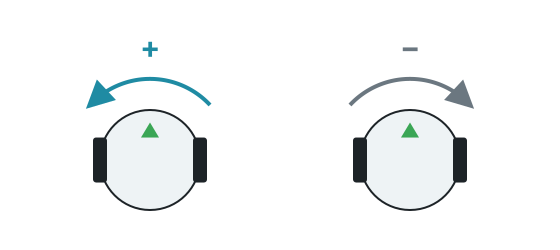
getValues() returns [x, y, z]. The Y axis is vertical, so getValues()[1] is the turning speed of the robot. It is positive when turning to the left.
Example: turning 90 degrees
Section titled “Example: turning 90 degrees”Add up the rotation speed multiplied by the time step to get the angle turned. This is more reliable than timing the turn, because it does not depend on the speed.
from controller import Robotimport math
robot = Robot()timestep = int(robot.getBasicTimeStep())
left = robot.getDevice("left wheel motor")right = robot.getDevice("right wheel motor")left.setPosition(float("inf"))right.setPosition(float("inf"))
gyro = robot.getDevice("gyro")gyro.enable(timestep)
def turnLeft(angle):    turned = 0    left.setVelocity(-2)    right.setVelocity(2)    while abs(turned) < angle and robot.step(timestep) != -1:        turned += gyro.getValues()[1] * timestep / 1000 # Speed multiplied by the time, in seconds    left.setVelocity(0)    right.setVelocity(0)
turnLeft(math.pi / 2)print("Turned 90 degrees")
#include <cmath>#include <iostream>#include <webots/Robot.hpp>#include <webots/Motor.hpp>#include <webots/Gyro.hpp>
using namespace webots;
Robot *robot;Motor *leftMotor, *rightMotor;Gyro *gyro;int timeStep;
void turnLeft(double angle) { double turned = 0; leftMotor->setVelocity(-2); rightMotor->setVelocity(2); while (fabs(turned) < angle && robot->step(timeStep) != -1) turned += gyro->getValues()[1] * timeStep / 1000.0; // Speed multiplied by the time, in seconds leftMotor->setVelocity(0); rightMotor->setVelocity(0);}
int main() { robot = new Robot(); timeStep = (int)robot->getBasicTimeStep();
leftMotor = robot->getMotor("left wheel motor"); rightMotor = robot->getMotor("right wheel motor"); leftMotor->setPosition(INFINITY); rightMotor->setPosition(INFINITY);
gyro = robot->getGyro("gyro"); gyro->enable(timeStep);
turnLeft(M_PI / 2); std::cout << "Turned 90 degrees" << std::endl;
delete robot; return 0;}In a test on the starter robot, the angle calculated like this matched the real rotation to within 0.01 radians. Small errors add up over a game, so correct the heading when you can, for example by aligning with a wall.
Accelerometer
Section titled “Accelerometer”The accelerometer returns the acceleration along each axis in m/s². On the starter robot it is named accelerometer. At rest, getValues()[1] reads about 9.8, which is gravity.
Inertial unit
Section titled “Inertial unit”The inertial unit is not on the starter robot. With the Robot Customizer you can add one, named inertial_unit by default. It gives the orientation directly, with getRollPitchYaw(), instead of having to add up rotation speeds. See the Webots reference.

Erebus is part of RoboCupJunior Rescue.
News, events and team documents: RCJ Rescue Community Website
© 2020–2026 Erebus Development Team