

 Bahasa Indonesia
 Deutsch
 English
 Español
 Français
 Português (Brasil)
 Türkçe
 ไทย
 中文(繁體)
 日本語
 한국어
陀螺仪和加速度计
陀螺仪返回机器人绕每个轴的转动速度,单位为弧度每秒。在入门机器人上,它的名字是 gyro。
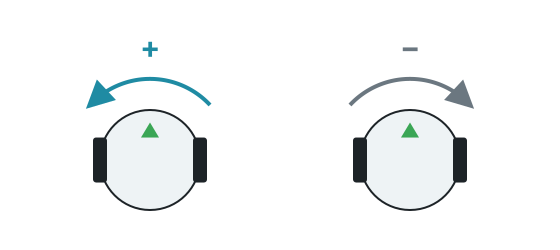
getValues() 返回 [x, y, z]。Y 轴是竖直方向,所以 getValues()[1] 就是机器人的转向速度。向左转时它为正值。
示例:转 90 度
Section titled “示例:转 90 度”把转动速度乘以时间步长,再累加起来,就能得到转过的角度。这比按时间控制转向更可靠,因为它不依赖于速度。
from controller import Robotimport math
robot = Robot()timestep = int(robot.getBasicTimeStep())
left = robot.getDevice("left wheel motor")right = robot.getDevice("right wheel motor")left.setPosition(float("inf"))right.setPosition(float("inf"))
gyro = robot.getDevice("gyro")gyro.enable(timestep)
def turnLeft(angle):    turned = 0    left.setVelocity(-2)    right.setVelocity(2)    while abs(turned) < angle and robot.step(timestep) != -1:        turned += gyro.getValues()[1] * timestep / 1000 # Speed multiplied by the time, in seconds    left.setVelocity(0)    right.setVelocity(0)
turnLeft(math.pi / 2)print("Turned 90 degrees")
#include <cmath>#include <iostream>#include <webots/Robot.hpp>#include <webots/Motor.hpp>#include <webots/Gyro.hpp>
using namespace webots;
Robot *robot;Motor *leftMotor, *rightMotor;Gyro *gyro;int timeStep;
void turnLeft(double angle) { double turned = 0; leftMotor->setVelocity(-2); rightMotor->setVelocity(2); while (fabs(turned) < angle && robot->step(timeStep) != -1) turned += gyro->getValues()[1] * timeStep / 1000.0; // Speed multiplied by the time, in seconds leftMotor->setVelocity(0); rightMotor->setVelocity(0);}
int main() { robot = new Robot(); timeStep = (int)robot->getBasicTimeStep();
leftMotor = robot->getMotor("left wheel motor"); rightMotor = robot->getMotor("right wheel motor"); leftMotor->setPosition(INFINITY); rightMotor->setPosition(INFINITY);
gyro = robot->getGyro("gyro"); gyro->enable(timeStep);
turnLeft(M_PI / 2); std::cout << "Turned 90 degrees" << std::endl;
delete robot; return 0;}在入门机器人上的测试中,用这种方法算出的角度与实际转动的误差在 0.01 弧度以内。在一场比赛中,小误差会不断累积,所以有机会时要校正朝向,例如让机器人对齐墙壁。
加速度计返回沿每个轴的加速度,单位为 m/s²。在入门机器人上,它的名字是 accelerometer。静止时,getValues()[1] 的读数约为 9.8,也就是重力加速度。
入门机器人上没有惯性单元。你可以用 Robot Customizer 添加一个,它的默认名字是 inertial_unit。它可以通过 getRollPitchYaw() 直接给出朝向,而不需要累加转动速度。请参阅 Webots 参考文档。

Erebus 是 RoboCupJunior Rescue 的一部分。
新闻、活动和队伍文档:RCJ Rescue 社区网站
© 2020–2026 Erebus Development Team