

 Bahasa Indonesia
 Deutsch
 English
 Español
 Français
 Português (Brasil)
 Türkçe
 中文(简体)
 中文(繁體)
 日本語
 한국어
ไจโรสโคปและมาตรความเร่ง
ไจโรสโคป
หัวข้อที่มีชื่อว่า “ไจโรสโคป”ไจโรสโคปคืนค่าความเร็วในการหมุนของหุ่นยนต์รอบแต่ละแกน เป็นเรเดียนต่อวินาที บนหุ่นยนต์เริ่มต้นมีชื่อว่า gyro
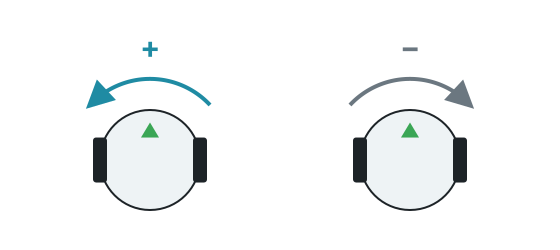
getValues() คืนค่า [x, y, z] โดยแกน Y เป็นแนวตั้ง ดังนั้น getValues()[1] คือความเร็วในการเลี้ยวของหุ่นยนต์ ค่าจะเป็นบวกเมื่อเลี้ยวซ้าย
ตัวอย่าง: เลี้ยว 90 องศา
หัวข้อที่มีชื่อว่า “ตัวอย่าง: เลี้ยว 90 องศา”รวมค่าความเร็วในการหมุนคูณด้วยไทม์สเต็ป (time step) เพื่อหามุมที่เลี้ยวไป วิธีนี้น่าเชื่อถือกว่าการควบคุมการเลี้ยวด้วยเวลา เพราะไม่ขึ้นกับความเร็ว
from controller import Robotimport math
robot = Robot()timestep = int(robot.getBasicTimeStep())
left = robot.getDevice("left wheel motor")right = robot.getDevice("right wheel motor")left.setPosition(float("inf"))right.setPosition(float("inf"))
gyro = robot.getDevice("gyro")gyro.enable(timestep)
def turnLeft(angle):    turned = 0    left.setVelocity(-2)    right.setVelocity(2)    while abs(turned) < angle and robot.step(timestep) != -1:        turned += gyro.getValues()[1] * timestep / 1000 # Speed multiplied by the time, in seconds    left.setVelocity(0)    right.setVelocity(0)
turnLeft(math.pi / 2)print("Turned 90 degrees")
#include <cmath>#include <iostream>#include <webots/Robot.hpp>#include <webots/Motor.hpp>#include <webots/Gyro.hpp>
using namespace webots;
Robot *robot;Motor *leftMotor, *rightMotor;Gyro *gyro;int timeStep;
void turnLeft(double angle) { double turned = 0; leftMotor->setVelocity(-2); rightMotor->setVelocity(2); while (fabs(turned) < angle && robot->step(timeStep) != -1) turned += gyro->getValues()[1] * timeStep / 1000.0; // Speed multiplied by the time, in seconds leftMotor->setVelocity(0); rightMotor->setVelocity(0);}
int main() { robot = new Robot(); timeStep = (int)robot->getBasicTimeStep();
leftMotor = robot->getMotor("left wheel motor"); rightMotor = robot->getMotor("right wheel motor"); leftMotor->setPosition(INFINITY); rightMotor->setPosition(INFINITY);
gyro = robot->getGyro("gyro"); gyro->enable(timeStep);
turnLeft(M_PI / 2); std::cout << "Turned 90 degrees" << std::endl;
delete robot; return 0;}ในการทดสอบบนหุ่นยนต์เริ่มต้น มุมที่คำนวณด้วยวิธีนี้ตรงกับการหมุนจริงโดยคลาดเคลื่อนไม่เกิน 0.01 เรเดียน ความคลาดเคลื่อนเล็ก ๆ จะสะสมขึ้นตลอดเกม ดังนั้นให้แก้ไขทิศทางเมื่อทำได้ เช่น โดยจัดแนวให้ตรงกับผนัง
มาตรความเร่ง
หัวข้อที่มีชื่อว่า “มาตรความเร่ง”มาตรความเร่งคืนค่าความเร่งตามแต่ละแกนเป็น m/s² บนหุ่นยนต์เริ่มต้นมีชื่อว่า accelerometer เมื่ออยู่นิ่ง getValues()[1] จะอ่านได้ประมาณ 9.8 ซึ่งคือแรงโน้มถ่วง
หน่วยวัดแรงเฉื่อย
หัวข้อที่มีชื่อว่า “หน่วยวัดแรงเฉื่อย”หุ่นยนต์เริ่มต้นไม่มีหน่วยวัดแรงเฉื่อย (inertial unit) คุณเพิ่มได้ด้วย Robot Customizer โดยมีชื่อเริ่มต้นว่า inertial_unit หน่วยนี้ให้ทิศทางการวางตัวโดยตรงด้วย getRollPitchYaw() แทนที่จะต้องรวมค่าความเร็วในการหมุนเอง ดูเอกสารอ้างอิงของ Webots

Erebus เป็นส่วนหนึ่งของ RoboCupJunior Rescue
ข่าว กิจกรรม และเอกสารของทีม: เว็บไซต์ชุมชน RCJ Rescue
© 2020–2026 Erebus Development Team