

 Bahasa Indonesia
 Deutsch
 English
 Español
 Français
 Português (Brasil)
 Türkçe
 中文(简体)
 中文(繁體)
 日本語
 한국어
เซนเซอร์ตำแหน่ง
เซนเซอร์ตำแหน่ง หรือ GPS ให้ตำแหน่งของหุ่นยนต์เป็นเมตร บนหุ่นยนต์เริ่มต้นมีชื่อว่า gps คุณต้องใช้เซนเซอร์นี้เพื่อรายงานสัญลักษณ์บนผนัง และยังช่วยได้มากในการสำรวจอย่างเป็นระบบ
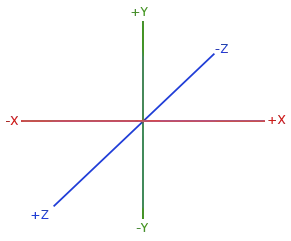
getValues() คืนค่า [x, y, z] โดย X และ Z เป็นแนวนอน ส่วน Y เป็นแนวตั้ง ดังนั้นให้ใช้ X และ Z เป็นตำแหน่งในเขาวงกต:
from controller import Robot
robot = Robot()timeStep = int(robot.getBasicTimeStep())
gps = robot.getDevice("gps")gps.enable(timeStep)
while robot.step(timeStep) != -1:    x, y, z = gps.getValues()  # In meters. X and Z are horizontal, Y is vertical.    print("x:", round(x, 3), "z:", round(z, 3))
#include <iostream>#include <webots/Robot.hpp>#include <webots/GPS.hpp>
using namespace webots;using namespace std;
int main() { Robot *robot = new Robot(); int timeStep = (int)robot->getBasicTimeStep();
GPS *gps = robot->getGPS("gps"); gps->enable(timeStep);
while (robot->step(timeStep) != -1) { const double *position = gps->getValues(); // In meters. X and Z are horizontal, Y is vertical. cout << "x: " << position[0] << " z: " << position[2] << endl; }
delete robot; return 0;}GPS มีสัญญาณรบกวน (noise) ไม่กี่มิลลิเมตร ค่าจึงเปลี่ยนเล็กน้อยแม้หุ่นยนต์จะหยุดนิ่ง อย่าเปรียบเทียบตำแหน่งว่าเท่ากันพอดี
ตัวอย่าง: ระยะห่างจากจุดเริ่มต้น
หัวข้อที่มีชื่อว่า “ตัวอย่าง: ระยะห่างจากจุดเริ่มต้น”โปรแกรมนี้ขับหุ่นยนต์ไปข้างหน้าจนกว่าจะห่างจากจุดเริ่มต้นครึ่งช่อง:
from controller import Robotimport math
robot = Robot()timeStep = int(robot.getBasicTimeStep())
gps = robot.getDevice("gps")gps.enable(timeStep)leftWheel = robot.getDevice("left wheel motor")rightWheel = robot.getDevice("right wheel motor")leftWheel.setPosition(float("inf"))rightWheel.setPosition(float("inf"))
robot.step(timeStep)  # Step once, so that the GPS has a valuestartX, _, startZ = gps.getValues()
leftWheel.setVelocity(3.0)rightWheel.setVelocity(3.0)
while robot.step(timeStep) != -1:    x, _, z = gps.getValues()    distance = math.sqrt((x - startX) ** 2 + (z - startZ) ** 2)    print("Distance from the start:", round(distance, 3), "m")    if distance > 0.06:  # Half a tile        leftWheel.setVelocity(0)        rightWheel.setVelocity(0)        break
#include <iostream>#include <cmath>#include <webots/Robot.hpp>#include <webots/GPS.hpp>#include <webots/Motor.hpp>
using namespace webots;using namespace std;
int main() { Robot *robot = new Robot(); int timeStep = (int)robot->getBasicTimeStep();
GPS *gps = robot->getGPS("gps"); gps->enable(timeStep); Motor *leftWheel = robot->getMotor("left wheel motor"); Motor *rightWheel = robot->getMotor("right wheel motor"); leftWheel->setPosition(INFINITY); rightWheel->setPosition(INFINITY);
robot->step(timeStep); // Step once, so that the GPS has a value double startX = gps->getValues()[0], startZ = gps->getValues()[2];
leftWheel->setVelocity(3.0); rightWheel->setVelocity(3.0);
while (robot->step(timeStep) != -1) { double x = gps->getValues()[0], z = gps->getValues()[2]; double distance = sqrt(pow(x - startX, 2) + pow(z - startZ, 2)); cout << "Distance from the start: " << distance << " m" << endl; if (distance > 0.06) { // Half a tile leftWheel->setVelocity(0); rightWheel->setVelocity(0); break; } }
delete robot; return 0;}
Erebus เป็นส่วนหนึ่งของ RoboCupJunior Rescue
ข่าว กิจกรรม และเอกสารของทีม: เว็บไซต์ชุมชน RCJ Rescue
© 2020–2026 Erebus Development Team