

 Deutsch
 English
 Español
 Français
 Português (Brasil)
 Türkçe
 ไทย
 中文(简体)
 中文(繁體)
 日本語
 한국어
Sensor lokasi
Sensor lokasi, atau GPS, memberikan posisi robot dalam meter. Pada robot pemula, namanya gps. Kamu membutuhkannya untuk melaporkan penanda dinding, dan sensor ini sangat membantu untuk menjelajah secara sistematis.
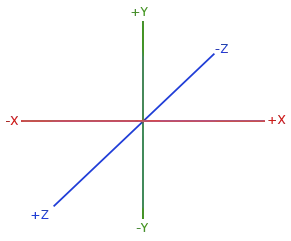
getValues() mengembalikan [x, y, z]. X dan Z adalah sumbu horizontal, dan Y vertikal, jadi gunakan X dan Z untuk posisi di labirin:
from controller import Robot
robot = Robot()timeStep = int(robot.getBasicTimeStep())
gps = robot.getDevice("gps")gps.enable(timeStep)
while robot.step(timeStep) != -1:    x, y, z = gps.getValues()  # In meters. X and Z are horizontal, Y is vertical.    print("x:", round(x, 3), "z:", round(z, 3))
#include <iostream>#include <webots/Robot.hpp>#include <webots/GPS.hpp>
using namespace webots;using namespace std;
int main() { Robot *robot = new Robot(); int timeStep = (int)robot->getBasicTimeStep();
GPS *gps = robot->getGPS("gps"); gps->enable(timeStep);
while (robot->step(timeStep) != -1) { const double *position = gps->getValues(); // In meters. X and Z are horizontal, Y is vertical. cout << "x: " << position[0] << " z: " << position[2] << endl; }
delete robot; return 0;}GPS memiliki derau (noise) beberapa milimeter, jadi nilainya sedikit berubah bahkan saat robot diam. Jangan pernah membandingkan apakah dua posisi sama persis.
Contoh: jarak dari titik awal
Section titled “Contoh: jarak dari titik awal”Program ini membuat robot maju sampai berjarak setengah ubin dari tempat awalnya:
from controller import Robotimport math
robot = Robot()timeStep = int(robot.getBasicTimeStep())
gps = robot.getDevice("gps")gps.enable(timeStep)leftWheel = robot.getDevice("left wheel motor")rightWheel = robot.getDevice("right wheel motor")leftWheel.setPosition(float("inf"))rightWheel.setPosition(float("inf"))
robot.step(timeStep)  # Step once, so that the GPS has a valuestartX, _, startZ = gps.getValues()
leftWheel.setVelocity(3.0)rightWheel.setVelocity(3.0)
while robot.step(timeStep) != -1:    x, _, z = gps.getValues()    distance = math.sqrt((x - startX) ** 2 + (z - startZ) ** 2)    print("Distance from the start:", round(distance, 3), "m")    if distance > 0.06:  # Half a tile        leftWheel.setVelocity(0)        rightWheel.setVelocity(0)        break
#include <iostream>#include <cmath>#include <webots/Robot.hpp>#include <webots/GPS.hpp>#include <webots/Motor.hpp>
using namespace webots;using namespace std;
int main() { Robot *robot = new Robot(); int timeStep = (int)robot->getBasicTimeStep();
GPS *gps = robot->getGPS("gps"); gps->enable(timeStep); Motor *leftWheel = robot->getMotor("left wheel motor"); Motor *rightWheel = robot->getMotor("right wheel motor"); leftWheel->setPosition(INFINITY); rightWheel->setPosition(INFINITY);
robot->step(timeStep); // Step once, so that the GPS has a value double startX = gps->getValues()[0], startZ = gps->getValues()[2];
leftWheel->setVelocity(3.0); rightWheel->setVelocity(3.0);
while (robot->step(timeStep) != -1) { double x = gps->getValues()[0], z = gps->getValues()[2]; double distance = sqrt(pow(x - startX, 2) + pow(z - startZ, 2)); cout << "Distance from the start: " << distance << " m" << endl; if (distance > 0.06) { // Half a tile leftWheel->setVelocity(0); rightWheel->setVelocity(0); break; } }
delete robot; return 0;}
Erebus adalah bagian dari RoboCupJunior Rescue.
Berita, acara, dan dokumen tim: Situs Web Komunitas RCJ Rescue
© 2020–2026 Erebus Development Team