

 Bahasa Indonesia
 Deutsch
 English
 Español
 Français
 Português (Brasil)
 ไทย
 中文(简体)
 中文(繁體)
 日本語
 한국어
Konum sensörü
Konum sensörü ya da GPS, robotun konumunu metre cinsinden verir. Başlangıç robotunda adı gps’tir. Duvar işaretlerini bildirmek için ona ihtiyacın var ve sistemli keşif yapmana da çok yardımcı olur.
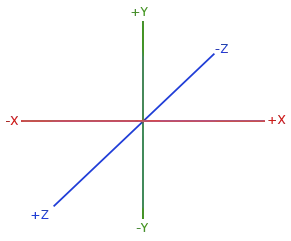
getValues(), [x, y, z] döndürür. X ve Z yataydır, Y ise dikeydir. Bu yüzden labirentteki konum için X ve Z’yi kullan:
from controller import Robot
robot = Robot()timeStep = int(robot.getBasicTimeStep())
gps = robot.getDevice("gps")gps.enable(timeStep)
while robot.step(timeStep) != -1:    x, y, z = gps.getValues()  # In meters. X and Z are horizontal, Y is vertical.    print("x:", round(x, 3), "z:", round(z, 3))
#include <iostream>#include <webots/Robot.hpp>#include <webots/GPS.hpp>
using namespace webots;using namespace std;
int main() { Robot *robot = new Robot(); int timeStep = (int)robot->getBasicTimeStep();
GPS *gps = robot->getGPS("gps"); gps->enable(timeStep);
while (robot->step(timeStep) != -1) { const double *position = gps->getValues(); // In meters. X and Z are horizontal, Y is vertical. cout << "x: " << position[0] << " z: " << position[2] << endl; }
delete robot; return 0;}GPS’in birkaç milimetrelik gürültüsü vardır; bu yüzden robot dururken bile değerler biraz değişir. Konumların tam olarak eşit olup olmadığını asla kontrol etme.
Örnek: başlangıçtan uzaklık
Bölüm başlığı “Örnek: başlangıçtan uzaklık”Bu program, robot başladığı yerden yarım kare uzaklaşana kadar ileri gider:
from controller import Robotimport math
robot = Robot()timeStep = int(robot.getBasicTimeStep())
gps = robot.getDevice("gps")gps.enable(timeStep)leftWheel = robot.getDevice("left wheel motor")rightWheel = robot.getDevice("right wheel motor")leftWheel.setPosition(float("inf"))rightWheel.setPosition(float("inf"))
robot.step(timeStep)  # Step once, so that the GPS has a valuestartX, _, startZ = gps.getValues()
leftWheel.setVelocity(3.0)rightWheel.setVelocity(3.0)
while robot.step(timeStep) != -1:    x, _, z = gps.getValues()    distance = math.sqrt((x - startX) ** 2 + (z - startZ) ** 2)    print("Distance from the start:", round(distance, 3), "m")    if distance > 0.06:  # Half a tile        leftWheel.setVelocity(0)        rightWheel.setVelocity(0)        break
#include <iostream>#include <cmath>#include <webots/Robot.hpp>#include <webots/GPS.hpp>#include <webots/Motor.hpp>
using namespace webots;using namespace std;
int main() { Robot *robot = new Robot(); int timeStep = (int)robot->getBasicTimeStep();
GPS *gps = robot->getGPS("gps"); gps->enable(timeStep); Motor *leftWheel = robot->getMotor("left wheel motor"); Motor *rightWheel = robot->getMotor("right wheel motor"); leftWheel->setPosition(INFINITY); rightWheel->setPosition(INFINITY);
robot->step(timeStep); // Step once, so that the GPS has a value double startX = gps->getValues()[0], startZ = gps->getValues()[2];
leftWheel->setVelocity(3.0); rightWheel->setVelocity(3.0);
while (robot->step(timeStep) != -1) { double x = gps->getValues()[0], z = gps->getValues()[2]; double distance = sqrt(pow(x - startX, 2) + pow(z - startZ, 2)); cout << "Distance from the start: " << distance << " m" << endl; if (distance > 0.06) { // Half a tile leftWheel->setVelocity(0); rightWheel->setVelocity(0); break; } }
delete robot; return 0;}
Erebus, RoboCupJunior Rescue programının bir parçasıdır.
Haberler, etkinlikler ve takım belgeleri: RCJ Rescue Topluluk Web Sitesi
© 2020–2026 Erebus Development Team